

Download Snipshot – Free Online Graphics Editor, Browser Extension
Overview
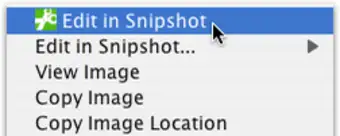
Snipshot is a lightweight, browser‑based graphics editor that brings the power of a traditional image‑editing program directly into your web browsing experience. In the era of Web 2.0, where images are shared and repurposed at lightning speed, Snipshot eliminates the need to launch a heavyweight desktop application for quick tasks such as cropping, resizing, or rotating pictures. Once installed, the extension adds a convenient “Edit in Snipshot” option to the right‑click context menu, allowing you to edit any image on the web or from your local drive with just a couple of clicks.
The tool supports two popular output formats—GIF and JPG—and can even push edited files straight to your Flickr account, making it an ideal companion for photographers, social‑media managers, and casual users alike. One of the most reassuring aspects of Snipshot is its non‑destructive workflow: the original image remains untouched, while a temporary copy is stored on the service for 24 hours, giving you ample time to revert or redo changes. The interface mirrors the simplicity of classic editors, featuring an intuitive toolbar, real‑time preview, and a single‑click “Undo” button that instantly restores the previous state.
Whether you need to trim a banner, resize a product photo, or quickly adjust orientation before sharing, Snipshot delivers a seamless, secure, and free solution that fits neatly into modern browsing habits.
Key Features
- One‑Click Context Menu Access: Right‑click any image and select “Edit in Snipshot” to launch the editor instantly.
- Five Core Editing Functions: Undo, resize, crop, rotate, and basic adjustments (brightness/contrast) are available directly in the toolbar.
- Web & Local Image Import: Load pictures from your computer or paste a URL to edit online images without downloading first.
- Non‑Destructive Editing: Original files stay unchanged; edited versions are saved temporarily for 24 hours.
- Export Options: Save edited images as GIF or JPG, with automatic optimization for web use.
- Flickr Integration: Seamlessly upload finished images to your Flickr account with a single click.
- Cross‑Platform Compatibility: Works on Chrome, Firefox, Edge, and Safari across Windows, macOS, Linux, Android, and iOS browsers.
- Secure Cloud Storage: All temporary files are encrypted during the 24‑hour retention period.
- Lightweight Performance: The extension loads in under two seconds and consumes minimal system resources.
- Regular Updates: Frequent feature enhancements and security patches keep the tool up‑to‑date.
Installation, Usage & Compatibility
Step‑by‑Step Installation
Getting Snipshot up and running is straightforward. Visit the official Chrome Web Store (or the equivalent extension marketplace for Firefox, Edge, and Safari) and click the “Add to Browser” button. A permissions dialog will appear, requesting access to read and modify images on web pages—this is essential for the right‑click editing feature.
Approve the request, and the extension icon will appear next to your address bar. For users on Android or iOS, simply open the browser’s extension manager, search for “Snipshot,” and enable it. No additional software downloads are required, making the process completely free and secure.
How to Use Snipshot Effectively
Once installed, edit any image in three easy steps. First, locate the image you wish to modify—whether it’s a product photo on an e‑commerce site or a meme you found on social media. Right‑click the image and select “Edit in Snipshot” from the context menu.
The editor opens in a lightweight overlay, displaying the original picture on the left and a real‑time preview on the right. Use the toolbar to apply your desired changes: drag the corners to resize, draw a rectangle to crop, rotate with the circular handle, or click the adjustment icon to tweak brightness and contrast. If you make a mistake, the dedicated “Undo” button instantly reverts the last action, and you can continue editing without losing progress.
When satisfied, click “Save” to choose GIF or JPG, then either download the file to your device or hit the “Upload to Flickr” button for immediate sharing. The edited image is also stored temporarily on Snipshot’s secure servers, where you can retrieve it within 24 hours if needed.
Operating System & Browser Compatibility
Snipshot is built on modern web technologies (HTML5, CSS3, and JavaScript) and therefore runs natively in any up‑to‑date browser. It is fully compatible with Windows 10/11, macOS Ventura and later, major Linux distributions (Ubuntu, Fedora, etc.), as well as Chrome OS. Mobile users on Android 12+ and iOS 15+ can access the extension through supported browsers that allow add‑ons, such as Kiwi Browser on Android or Safari’s extension manager on iOS. Because the tool does not rely on native OS libraries, you can expect consistent performance across platforms, with the same feature set and UI layout regardless of the device you use.
Pros & Cons
Advantages
- Fast, one‑click access directly from the browser context menu.
- Zero‑cost, free to use with no hidden fees or trial periods.
- Non‑destructive editing preserves original files and provides a 24‑hour rollback window.
- Lightweight footprint—does not slow down your computer or consume excessive RAM.
- Secure cloud storage with encryption for temporary files.
- Seamless Flickr integration for quick photo sharing.
- Works across all major operating systems and browsers.
- Regular updates keep the tool current with web standards.
Drawbacks
- Limited to basic editing functions; no advanced layers or filters.
- Only GIF and JPG export formats are supported—no PNG or SVG.
- Temporary file retention is limited to 24 hours; longer storage requires manual download.
- Requires an internet connection for cloud features and Flickr upload.
- Some corporate browsers may block extensions for security policies.
Frequently Asked Questions
Is Snipshot really free?
Yes, Snipshot is completely free to download and use. There are no hidden subscription fees or premium tiers. All core editing features, cloud storage for 24 hours, and Flickr integration are available at no cost.Can I edit images that are protected by copyright?
Snipshot respects the same legal standards as any web browser. You can edit images you own or have permission to modify. For copyrighted material, ensure you have the appropriate rights before editing or redistributing the image.Do I need an account to use Snipshot?
No, an account is not required for basic editing or saving locally. An account is only needed if you wish to use the Flickr upload feature, which relies on your existing Flickr credentials.How secure is the temporary cloud storage?
All temporary files are encrypted in transit (HTTPS) and at rest using industry‑standard AES‑256 encryption. Files are automatically purged after 24 hours, minimizing any risk of long‑term exposure.Can I use Snipshot on mobile browsers?
Yes. Snipshot works on mobile browsers that support extensions, such as Kiwi Browser on Android and Safari on iOS. The user interface adapts to smaller screens, providing the same core tools for quick edits on the go.Conclusion & Call to Action
Snipshot fills a distinct niche in the crowded world of image‑editing software by offering a fast, secure, and completely free solution that lives inside your web browser. Its non‑destructive workflow, instant access via the context menu, and seamless integration with Flickr make it especially valuable for users who need to tweak images on the fly without the overhead of a full‑featured desktop editor. While power users may miss advanced features like layers or a broader format selection, the simplicity and speed of Snipshot outweigh those limitations for everyday tasks such as cropping a screenshot, resizing a product photo, or rotating a meme before sharing. If you frequently find yourself opening Photoshop or GIMP for minor adjustments, give Snipshot a try—download the extension today, and experience a smoother, more efficient way to edit images directly from the web.
Snipshot delivers a surprisingly robust set of tools for a browser extension. Its ease of use and zero‑cost model make it a standout choice for quick image edits. The only real drawback is the lack of advanced export options, but for most web‑focused workflows, Snipshot hits the sweet spot.






